多线程:共享内存空间,提高CPU使用效率
进程是资源分配的单位,线程是CPU调度的单位:启动一个进程之后,会有一个主线程去依次执行
进程号0:用来进程之间的切换,而进程号1:用来生成新进程(所有进程的父进程)
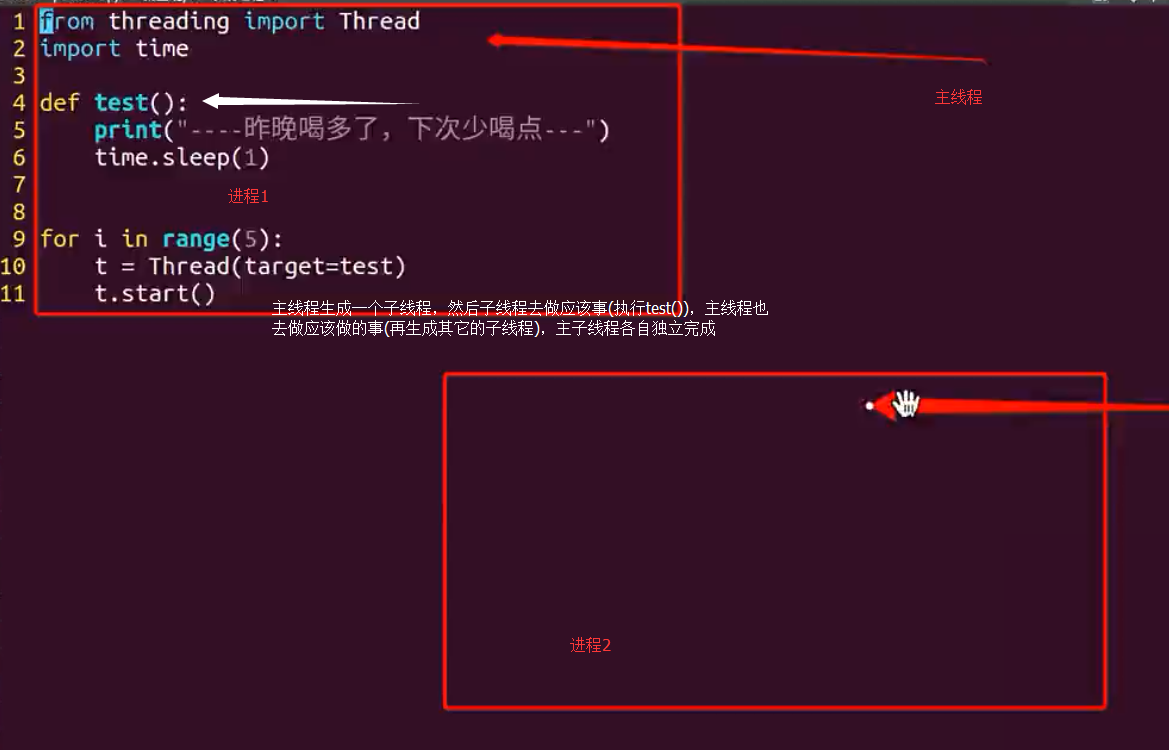
创建了5个线程,分别各个执行,不会相互干扰
同时即使主线程完成任务了,也不会退出,而是要等到子线程完成之后才退出,往往是为了收回子线程的资源
线程例子1
1 2 3 4 5 6 7 8 9 10 11 12 13 14 15 16 17 18 19 20 21 22 23 24 25 26 27 28 29 30 31
| import threading from time import ctime,sleep def music(func): for i in range(2): print( "I was listening to %s. %s" %(func,ctime())) sleep(1) def move(func): for i in range(2): print( "I was at the %s! %s" %(func,ctime())) sleep(5) threads = [] t1 = threading.Thread(target=music,args=(u'爱情买卖',)) threads.append(t1) t2 = threading.Thread(target=move,args=(u'阿凡达',)) threads.append(t2) if __name__ == '__main__': for t in threads: t.setDaemon(True) """ 线程声明为守护线程,必须在start() 方法调用之前设置 如果不设置为守护线程程序会被无限挂起. 子线程启动后,父线程也继续执行下去,当父线程执行完最后一条语句print "all over %s" %ctime()后 没有等待子线程,直接就退出了,同时子线程也一同结束""" t.start() t.join() """ 在子线程完成运行之前,这个子线程的父线程将一直被阻塞.join()实际上意味着等到队列为空,再执行别的操作 join()方法的位置是在for循环外的,也就是说必须等待for循环里的两个进程都结束后,才去执行主进程 """ print( "all over %s" %ctime())
|
线程例子2
1 2 3 4 5 6 7 8 9 10 11 12 13 14 15 16 17 18 19 20 21 22 23 24 25 26 27 28 29 30 31 32 33 34
| import _thread import threading import time exitFlag = 0 class myThread (threading.Thread): def __init__(self, delay): threading.Thread.__init__(self) self.delay = delay def run(self): print( "Starting " + self.name) print_time(threadName=self.name,delay=self.delay,counter=5) print( "Exiting " + self.name) def print_time(threadName, delay, counter): while counter: if exitFlag: _thread.exit() time.sleep(delay) print( "%s: %s" % (threadName, time.ctime(time.time()))) counter -= 1 thread1 = myThread( delay=1) thread2 = myThread( delay=2) thread1.start() thread2.start() print( "Exiting Main Thread")
|
多线程的复杂度
• 资源、数据的安全性:锁保护
• 原子性:数据操作是天然互斥的(不可分割,要不成功,要不失败)
• 同步等待:wait() notify() notifyAll()
• 死锁:多个线程对资源互锁,造成死锁
• 容灾:任何线程出现错误,整个进程都会停止
互斥问题
死锁:在线程间共享多个资源的时候,如果两个线程分别占有⼀部分资源并且同时等待对⽅的资源,就会造成死锁
线程同进程的执行顺利一样都是不确定的,是由调度算法决定的
线程之间共享全局变量,进程不共享,所以才有进程间的通信,所以才有线程的资源竞争,互斥,死锁等问题
同时创建线程时,传递的参数是列表也是共享的
互斥锁
1 2 3 4 5 6 7 8 9 10 11 12 13 14 15 16 17 18 19 20 21 22 23 24 25 26 27 28 29 30 31 32 33 34 35 36 37 38 39 40 41 42 43 44 45 46
| from threading import Thread, Lock import time l = [22,33] g_num = 0 def test1(l): global g_num mutex.acquire() for i in range(1000000): g_num += 1 mutex.release() print("---test1---g_num=%d"%g_num) l.append(11) print(l) def test2(l): global g_num mutex.acquire() for i in range(1000000): g_num += 1 mutex.release() print("---test2---g_num=%d"%g_num) l.append(44) print(l) mutex = Lock() p1 = Thread(target=test1,args=(l,)) p1.start() p2 = Thread(target=test2,args=(l,)) p2.start() print("---g_num=%d---"%g_num)
|
全局变量在多个线程中共享,为了保证正确运行需要锁
非全局变量在每个线程中各有一份,不会共享,当然了不需要加锁
同步线程(继承类)
1 2 3 4 5 6 7 8 9 10 11 12 13 14 15 16 17 18 19 20 21 22 23 24 25 26 27 28 29 30 31 32 33 34 35 36 37 38 39 40 41 42 43 44 45 46 47 48 49 50 51 52 53 54 55 56 57 58 59 60 61
| import threading from datetime import datetime import time import _thread exitFlag = 0 class myThread (threading.Thread): def __init__(self, delay): threading.Thread.__init__(self) self.delay = delay def run(self): print( "Starting " + self.name) threadLock.acquire() print_time(threadName=self.name, delay=self.delay, counter=5) threadLock.release() print( "Exiting " + self.name) def print_time(threadName, delay, counter): while counter: if exitFlag: _thread.exit() time.sleep(delay) print( "%s: %s" % (threadName, time.ctime(time.time()))) counter -= 1 threadLock = threading.Lock() threads = [] thread1 = myThread( delay=1) thread2 = myThread(delay=2) n = datetime.now() thread1.start() thread1.join() thread2.start() threads.append(thread1) threads.append(thread2) for t in threads: t.join() print("Exiting Main Thread") print(datetime.now()-n)
|
线程quere用法
1 2 3 4 5 6 7 8 9 10 11 12 13 14 15 16 17 18 19 20 21 22 23 24 25 26 27 28 29 30 31 32 33 34 35 36 37 38 39 40 41 42 43 44 45 46 47
| import queue, time, threading, datetime class Job: def __init__(self, name): self.name = name def do(self): time.sleep(2) print("\t[Info] Job({0}) is done!".format(self.name)) que = queue.Queue() for i in range(20): que.put(Job(str(i + 1))) print("\t[Info] Queue size={0}...".format(que.qsize())) st = datetime.datetime.now() while que.qsize() > 0: job = que.get() job.do() td = datetime.datetime.now() - st print("\t[Info] Spending time={0}!".format(td))
|
线程quere
1 2 3 4 5 6 7 8 9 10 11 12 13 14 15 16 17 18 19 20 21 22 23 24 25 26 27 28 29 30 31 32 33 34 35 36 37 38 39 40 41 42 43 44 45 46 47 48 49 50 51 52 53 54 55 56 57
| import queue, time, threading, datetime class Job: def __init__(self, name): self.name = name def do(self): time.sleep(2) print("\t[Info] Job({0}) is done!".format(self.name)) que = queue.Queue() for i in range(20): que.put(Job(str(i + 1))) print("\t[Info] Queue size={0}...".format(que.qsize())) def doJob(*args): queue = args[0] while queue.qsize() > 0: job = queue.get() job.do() thd1 = threading.Thread(target=doJob, name='Thd1', args=(que,)) thd2 = threading.Thread(target=doJob, name='Thd2', args=(que,)) thd3 = threading.Thread(target=doJob, name='Thd3', args=(que,)) st = datetime.datetime.now() thd1.start() thd2.start() thd3.start() while thd1.is_alive() or thd2.is_alive() or thd3.is_alive(): time.sleep(1) td = datetime.datetime.now() - st print("\t[Info] Spending time={0}!".format(td))
|
推荐使用
1 2 3 4 5 6 7 8 9 10 11 12 13 14 15 16 17 18 19 20 21 22 23 24 25 26 27 28 29 30 31 32 33 34 35
| import queue import threading from datetime import datetime SHARE_Q = queue.Queue() _WORKER_THREAD_NUM = 4 def worker(): global SHARE_Q while not SHARE_Q.empty(): one_dict = SHARE_Q.get() SHARE_Q.task_done() def main(): a= datetime.now() threads = [] global SHARE_Q library_list =['9787550215184','9787550206267'] for i in library_list: SHARE_Q.put(i) for i in range(_WORKER_THREAD_NUM): thr = threading.Thread(target=worker) thr.start() threads.append(thr) for thread in threads: thread.join() SHARE_Q.join() print(datetime.now() -a) print('success') if __name__ == '__main__': main()
|