hdfs的shell命令
|
|
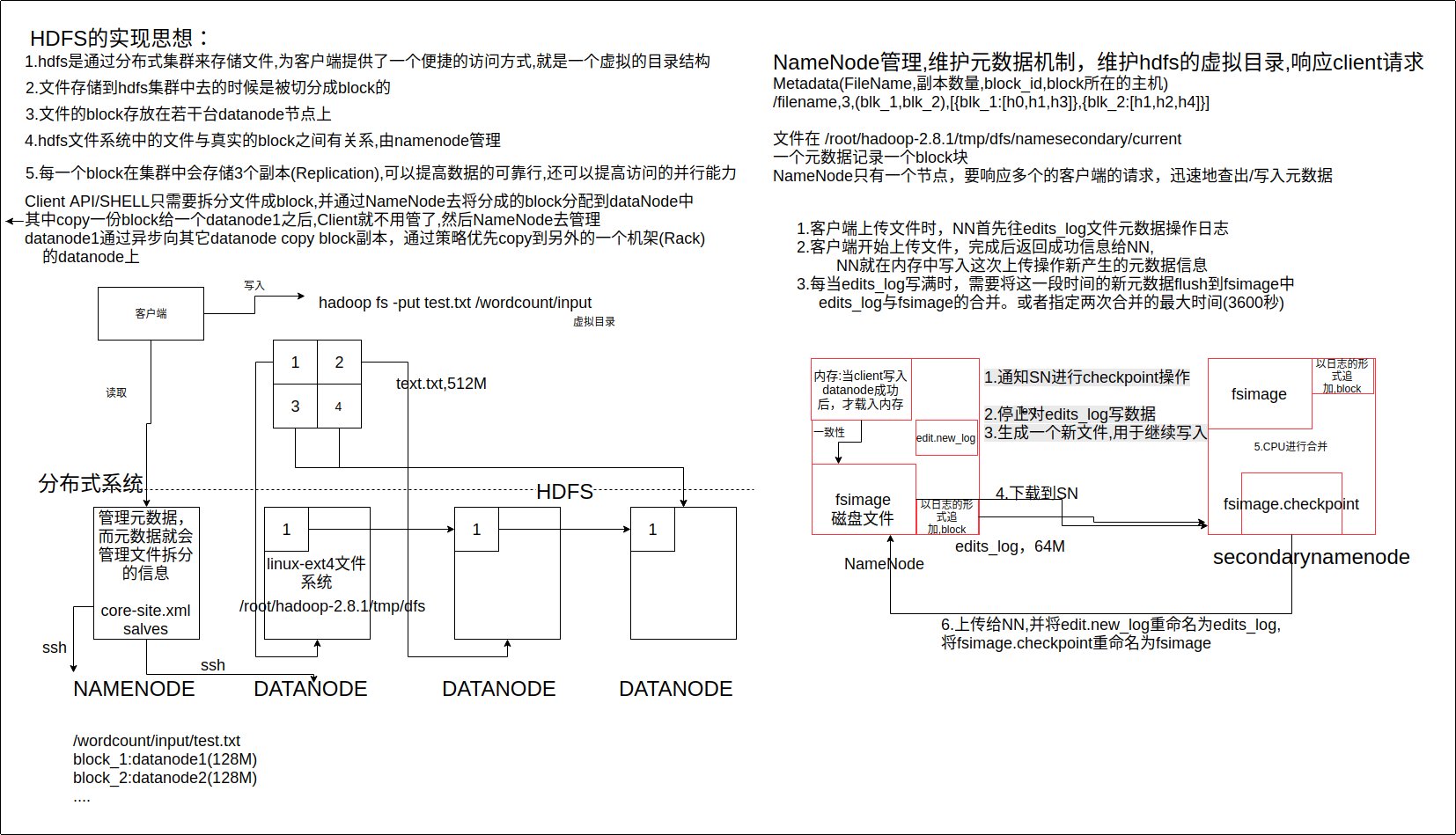
/root/hadoop-2.8.1/tmp/dfs/data/current/BP-XX/current/finalized:保存datanode主机的 block块的地方
java客户端调用HDFS API
安装eclipse,配置所需要的jar包和配置文件
- /root/hadoop-2.8.1/share/hadoop/common/下jar包,以及common jar中的依赖包common/bin 的所有jar
- /root/hadoop-2.8.1/share/hadoop/hdfs/下jar包,以及hdfs jar中的依赖包hdfs/bin 的所有jar,以及yarn,mapreduce目录下的
将/root/hadoop-2.8.1/etc下的 core-site.xml和hdfs-site.xml文件放在Project的src目录下
代码实现123456789101112131415161718192021222324252627282930313233343536373839404142434445464748495051525354555657585960616263646566676869707172737475767778798081828384858687888990919293949596979899100101102103104105106package cn.itcast.hadoop.hdfs;import java.io.FileInputStream;import java.io.FileNotFoundException;import java.io.FileOutputStream;import java.io.IOException;import java.net.URI;import java.net.URISyntaxException;import org.apache.commons.compress.utils.IOUtils;import org.apache.hadoop.conf.Configuration;import org.apache.hadoop.fs.FSDataInputStream;import org.apache.hadoop.fs.FSDataOutputStream;import org.apache.hadoop.fs.FileStatus;import org.apache.hadoop.fs.FileSystem;import org.apache.hadoop.fs.LocatedFileStatus;import org.apache.hadoop.fs.Path;import org.apache.hadoop.fs.RemoteIterator;import org.junit.Before;import org.junit.Test;public class HdfsUtil {FileSystem fs = null;public void init() throws IOException, InterruptedException, URISyntaxException {Configuration conf = new Configuration();conf.set("fs.defaultFS", "hdfs://cluster1:9000/");// 设置权限fs = FileSystem.get(new URI("hdfs://cluster1:9000/"),conf,"root");//如果在集群中只需要指定dfs.nameservices的值即可:hdfs://ns1///fs需要哪些成员才能读写hdfs文件// fs-->RPCProxy-->NameNode.open(src)}public void download() throws IOException {// input streamPath src =new Path("hdfs://cluster1:9000/install_hadoop.sh");FSDataInputStream in =fs.open(src);//ouput localFileOutputStream os=new FileOutputStream("/root/Downloads/install2.sh");IOUtils.copy(in, os);}public void download2() throws IOException {fs.copyFromLocalFile(new Path("hdfs://cluster1:9000/upload2.txt"),new Path("/root/Downloads/install2.sh"));}public void upload() throws IOException {// to upload a file to hdfsPath dst =new Path("hdfs://cluster1:9000/upload.txt");FSDataOutputStream os =fs.create(dst);FileInputStream in=new FileInputStream("/root/Downloads/install2.sh");IOUtils.copy(in, os);}public void upload2() throws IOException {fs.copyFromLocalFile(new Path("/root/Downloads/install2.sh"),new Path("hdfs://cluster1:9000/a/b/upload2.txt"));}public void mkdir() throws IllegalArgumentException, IOException {fs.mkdirs(new Path("/a/b"));}public void rm() throws IllegalArgumentException, IOException {fs.delete(new Path("/a"),true);}public void listFiles() throws FileNotFoundException, IllegalArgumentException, IOException {RemoteIterator<LocatedFileStatus> files = fs.listFiles(new Path("/"), true);while(files.hasNext()) {LocatedFileStatus file = files.next();//LocatedFileStatus 是通过RPC机制 得到的 fs也是类似Path filepath = file.getPath();String fileName = filepath.getName();System.out.println(fileName);}System.out.println("--------------");FileStatus[] listStatus = fs.listStatus(new Path("/"));for(FileStatus status: listStatus) {String name =status.getPath().getName();System.out.println(name);}}}
权限问题
如果不是在虚拟机上测试的话,会有权限的问题,需要在eclipse的Run Configuration的Arguments中的VM arguments中增加如下信息
-DHADOOP_USER_NAME=root