hadoop运行jar包
运行一个mapreduce程序job(打包成一个jar包)
1 2 3 4 5 6 7 8 9 10 11 12 13 14 15 16 17
| hadoop jar cd /root/hadoop-2.8.1/share/hadoop/mapreduce hadoop jar hadoop-mapreduce-examples-2.8.1.jar pi 5 5 vim test.txt hello world hello femn hello leipengkai hello friend hadoop fs -put test.txt /wordcount/input hadoop jar hadoop-mapreduce-examples-2.8.1.jar wordcount \ /wordcount/input /wordcount/output
|
MapReduce
处理海量数据的运算, 即使是一个很简单的逻辑,要把它变成分布式运行的程序将会面临很多的其它问题:
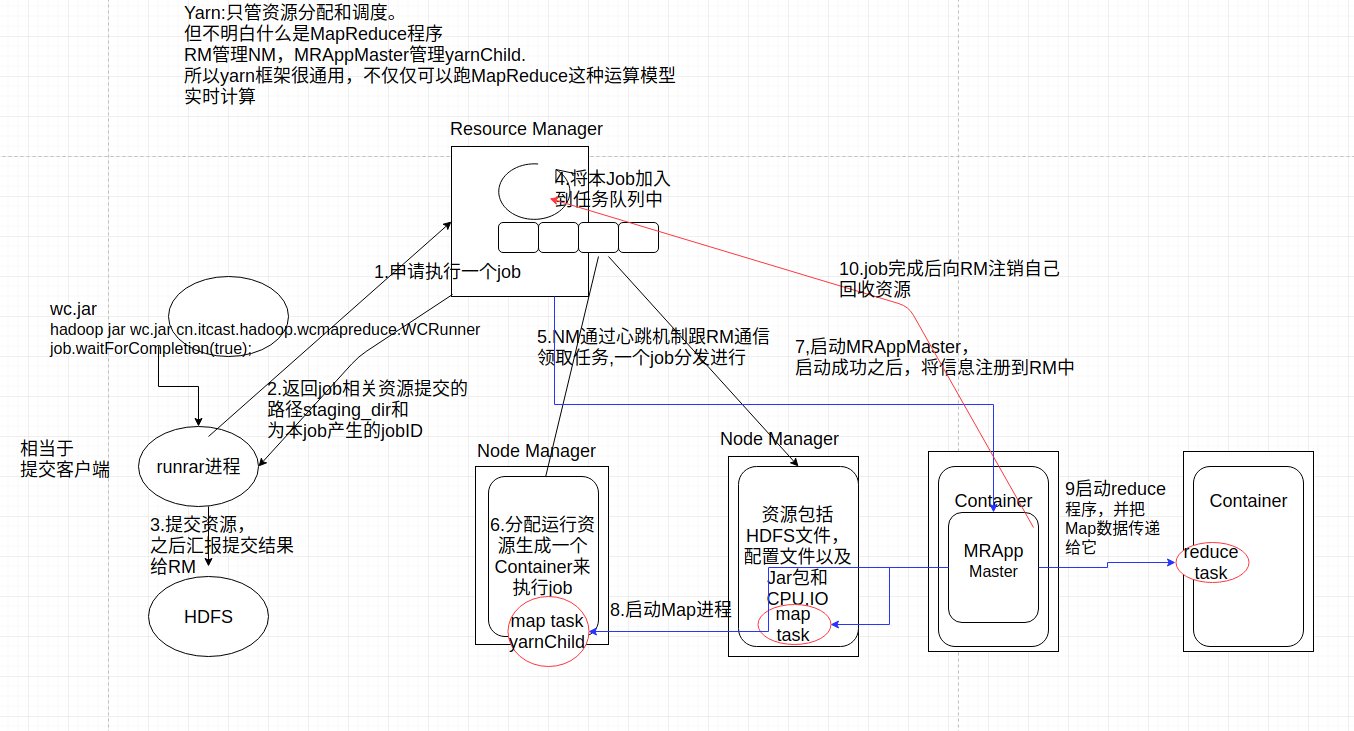
运算代码程序的资源分发和启动程序的环境配置,以及代码分发到哪些datanode上,并且还得监控datanode运行状态是否正常 以及datanode的调试汇总
解决思路:运算往数据方移动,而不是数据移动到运算这方来.
MapReduce分成两个步骤去完成业务逻辑:
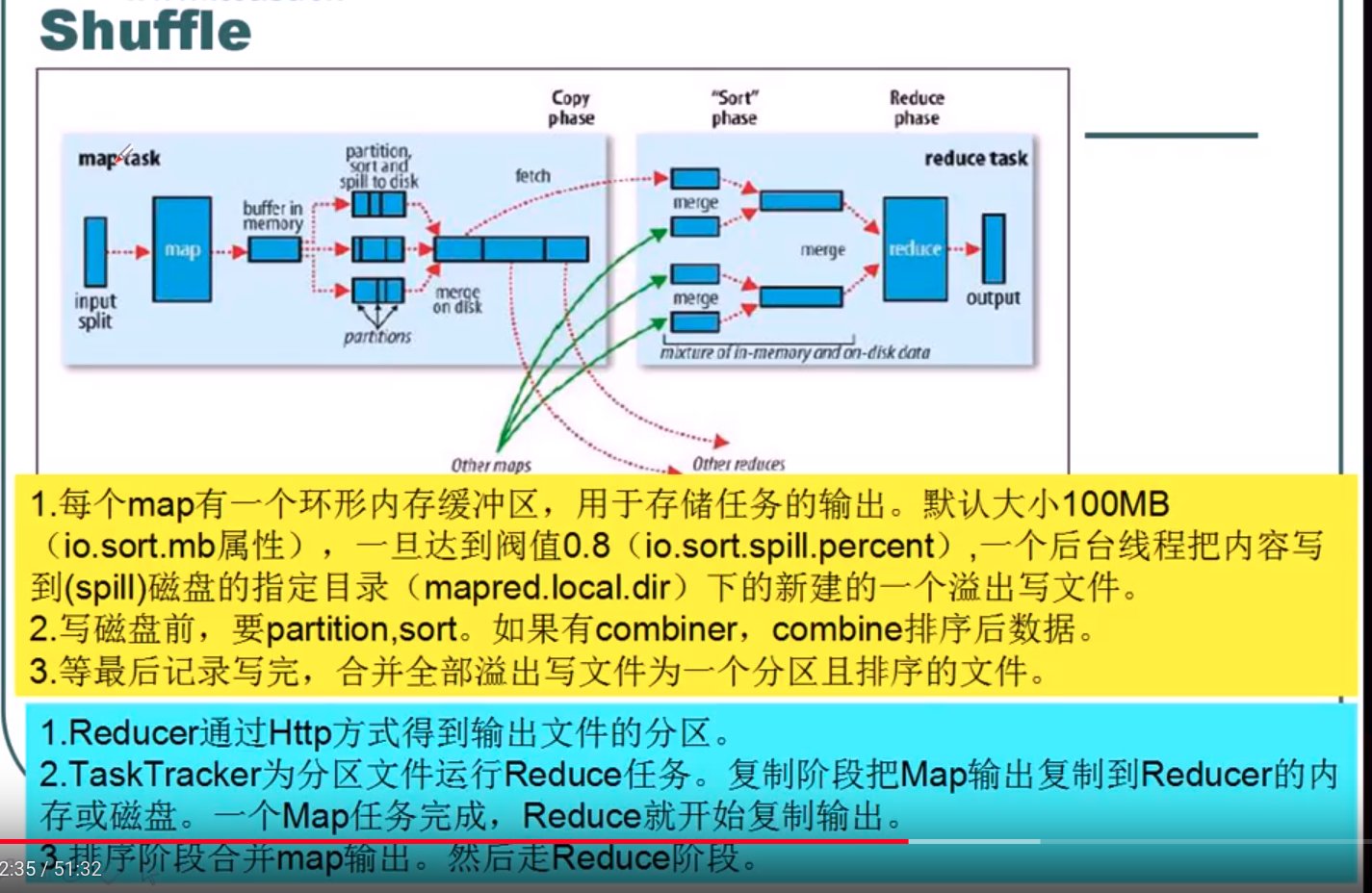
Map逻辑和Reduce逻辑都会在分布在datanode中,先执行Map,再执行Reduce.在Map程序时可高并发执行
实例代码
vim WCMAP.java
1 2 3 4 5 6 7 8 9 10 11 12 13 14 15 16 17 18 19 20 21 22 23 24 25 26 27 28 29 30 31 32 33 34 35 36 37 38 39 40 41 42 43 44
| package cn.itcast.hadoop.wcmapreduce; import java.io.IOException; import java.util.StringTokenizer; import org.apache.hadoop.io.LongWritable; import org.apache.hadoop.io.Text; import org.apache.hadoop.mapred.OutputCollector; import org.apache.hadoop.mapreduce.Mapper; import org.apache.hadoop.util.StringUtils; public class WCMap extends Mapper<LongWritable, Text, Text, LongWritable>{ private final static LongWritable one =new LongWritable(1); private Text word = new Text(); protected void map(LongWritable key,Text value,Context context) throws IOException, InterruptedException{ String line = value.toString(); char split = ' '; String[] words =StringUtils.split(line, split); for (String word: words) { context.write(new Text(word), new LongWritable(1)); } } }
|
vim WCReduce.java
1 2 3 4 5 6 7 8 9 10 11 12 13 14 15 16 17 18 19 20 21 22 23 24
| package cn.itcast.hadoop.wcmapreduce; import java.io.IOException; import org.apache.hadoop.io.LongWritable; import org.apache.hadoop.io.Text; import org.apache.hadoop.mapreduce.Reducer; public class WCReduce extends Reducer<Text, LongWritable, Text, LongWritable> { @Override protected void reduce(Text key, Iterable<LongWritable> values,Context context) throws IOException, InterruptedException { long count = 0; for (LongWritable v:values) { count += v.get(); } context.write(key, new LongWritable(count)); } }
|
vim WCRunner.java
1 2 3 4 5 6 7 8 9 10 11 12 13 14 15 16 17 18 19 20 21 22 23 24 25 26 27 28 29 30 31 32 33 34 35 36 37 38 39 40 41 42 43 44 45 46 47 48 49 50
| package cn.itcast.hadoop.wcmapreduce; import java.io.IOException; import org.apache.hadoop.conf.Configuration; import org.apache.hadoop.fs.Path; import org.apache.hadoop.io.LongWritable; import org.apache.hadoop.io.Text; import org.apache.hadoop.mapreduce.Job; import org.apache.hadoop.mapreduce.lib.input.FileInputFormat; import org.apache.hadoop.mapreduce.lib.output.FileOutputFormat; public class WCRunner { public static void main(String[] args) throws IOException, ClassNotFoundException, InterruptedException { Configuration conf = new Configuration(); conf.set("mapreduce.job.jar","/root/wc.jar"); Job job = Job.getInstance(conf); job.setJarByClass(WCRunner.class); job.setMapperClass(WCMap.class); job.setReducerClass(WCReduce.class); job.setMapOutputKeyClass(Text.class); job.setMapOutputValueClass(LongWritable.class); job.setOutputKeyClass(Text.class); job.setOutputValueClass(LongWritable.class); FileInputFormat.setInputPaths(job, new Path("hdfs://cluster1:9000/")); FileOutputFormat.setOutputPath(job, new Path("hdfs://cluster1:9000/wc/output")); job.waitForCompletion(true); } }
|
在本地测试可以启动Bebug模式,直接在虚拟机下用eclipse运行WCRunner
注意:如果是eclipse它会自动加载core-site.xml和hdfs-site.xml的配置文件,
所以可以写成如下,也是读取hdfs文件系统
1 2
| FileInputFormat.setInputPaths(job, new Path("/")); FileOutputFormat.setOutputPath(job, new Path("/wc/output"));
|
使用dhfs的话,可以不用启动yarn,只启动dhfs,这时的Mapreduce程序将跑在本机
不通过yarn分配
如果想要yarn分配在Node Manage运行Mapreduce,则在src下加上mapred-site.xml和yarn-site.xml文件
并加上如下代码,再运行
1
| conf.set("mapreduce.job.jar","/root/wc.jar");
|
也可以不用从hdfs中读写文件:
1 2
| FileInputFormat.setInputPaths(job, new Path("/root/test.txt")); FileOutputFormat.setOutputPath(job, new Path("/root/output"));
|
在集群中运行,将将整个项目打包成jar,让hadoop yarn分发运行Mapreduce程序
1 2 3 4
| hadoop fs -rm -f -R hdfs://cluster1:9000/* hadoop fs -put test.txt hdfs://cluster1:9000/ hadoop jar wc.jar cn.itcast.hadoop.wcmapreduce.WCRunner
|
注意:如果使用jar包运行的话,必须得指定成hdfs的文件系统格式
1 2
| FileInputFormat.setInputPaths(job, new Path("hdfs://cluster1:9000/")); FileOutputFormat.setOutputPath(job, new Path("hdfs://cluster1:9000/wc/output"));
|
查看运行的结果
1
| hadoop fs -cat hdfs://cluster1:9000/wc/output/part-r-00000
|
将信息打印到控制台
1
| export HADOOP_ROOT_LOGGER=DEBUG,console
|
总结MR程序的提交运行模式
本地模式
在eclipse里面直接运行main方法,不添加mapred-site.xml和yarn-site.xml
也会提交给localjobnumber执行,输出输出数据按如下设置保存在对应路径下:
1 2
| FileInputFormat.setInputPaths(job, new Path("/")); FileOutputFormat.setOutputPath(job, new Path("/wc/output"));
|
集群模式运行
将项目打成jar包,上传到服务器上,然后用hadoop命令提交:
1
| hadoop jar wc.jar cn.itcast.hadoop.wcmapreduce.WCRunner
|
在eclipse中运行main,在src下加上mapred-site.xml和yarn-site.xml文件
并加上如下代码,再运行
1
| conf.set("mapreduce.job.jar","/root/wc.jar");
|
Map进程数不是由block大小决定的,而是由一个切片(split)对应一个Map进程
Map task的并发数量是由切片的数量决定的,有多少个切片就启动多少个Map task
切片是个逻辑概念,指文件中数据中偏移量范围,block是物理概念
切片的具体大小应该根据所处理的文件大小来调整